Service Request Management
The Service Request Management feature provides the ability to manage service requests, allowing users to review, approve, or reject service requests. The feature is accessed through Miscellaneous menu.
Security Requirements
In order to process service requests, the user needs to have View permission on Service Request Management.
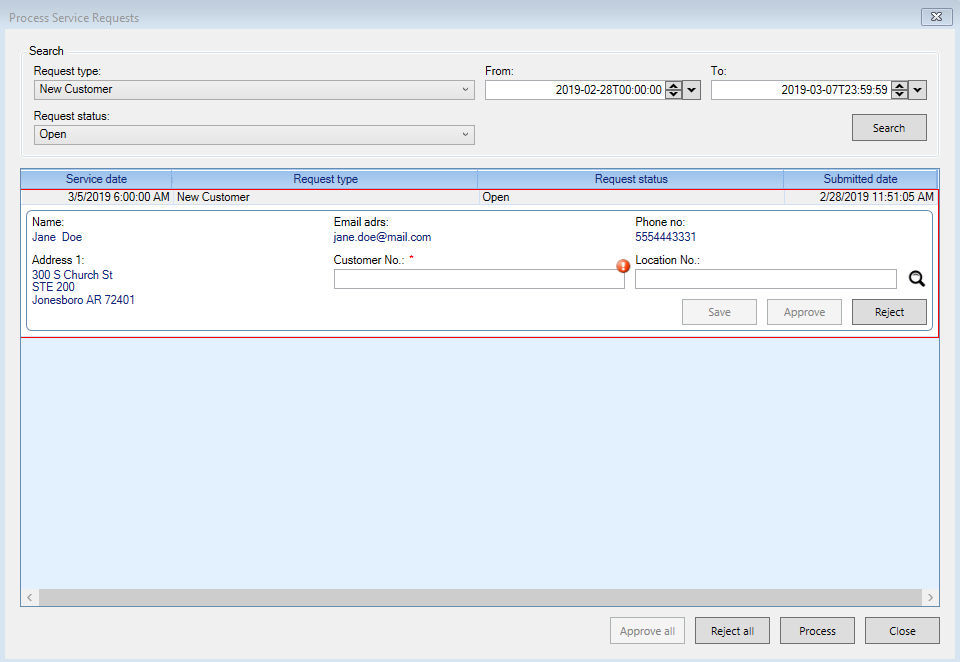
Figure 639: Service Request Management
Search
- Select the Request Type
Available request types are - New Customer
- Select the Request Status
Available statuses are - Open - Approved - Rejected
- Select the From date
Defaulted to current date.
- Select the To date
Defaulted to seven days from current date.
Click on the Search button to list the service requests for the selected filters.
Process
Selecting the Service Request on the grid expands the request details, with the option to Approve or Reject the individual item.
The Approve all action will mark all Open Service Requests as approved.
The Reject all action will mark all Open Service Requests as rejected.
The Process action picks all Approved Service Requests and executes the workflow depending on the type of the Service Request.